“Mera budget itna hai…”
Suggest dishes and combinations from the saved menu and prices. Help a guest explore options within their budget.
Budget and preferences → relevant options Climbrk
YOUR RESTAURANT’S WHATSAPP ASSISTANT
An automated assistant for food, budgets, parking and directions on WhatsApp. Collect table requests; your team confirms availability and handles personal replies.
Try answers before connecting. No coding. Try the example ↓
Going live needs a number not already on WhatsApp. Check the requirements →
Review the answers before you go live. Keep your business details up to date.
WHAT YOUR GUEST SEES Example conversation
Example conversation, not a live chat. The discount is fictional, with owner permission enabled. No booking or email is sent.
FAMILIAR QUESTIONS. A USEFUL FIRST ANSWER.
Help someone choose what suits their budget, find your place and plan a visit. Keep decisions that need a person with your team.
Suggest dishes and combinations from the saved menu and prices. Help a guest explore options within their budget.
Budget and preferences → relevant optionsAnswer from the hours, parking and facilities you have saved. If a detail is missing, the team can help.
Practical questions → your business detailsShare your saved address, landmark and directions clearly, so guests know how to reach you.
Address and directions → a clearer visitCollect the group size and visit time, then pass the request to your team to confirm availability.
Planned next: priority email alert to the ownerOffer a discount only when you enable it and set valid rules for an eligible item. You control the limit, conditions and end date.
Owner-approved offers → within your rulesExplain dishes, sizes and prices from your saved information. For allergy and safety questions, bring in your team.
Menu questions → answers with staff supportWHAT YOUR TEAM SEES
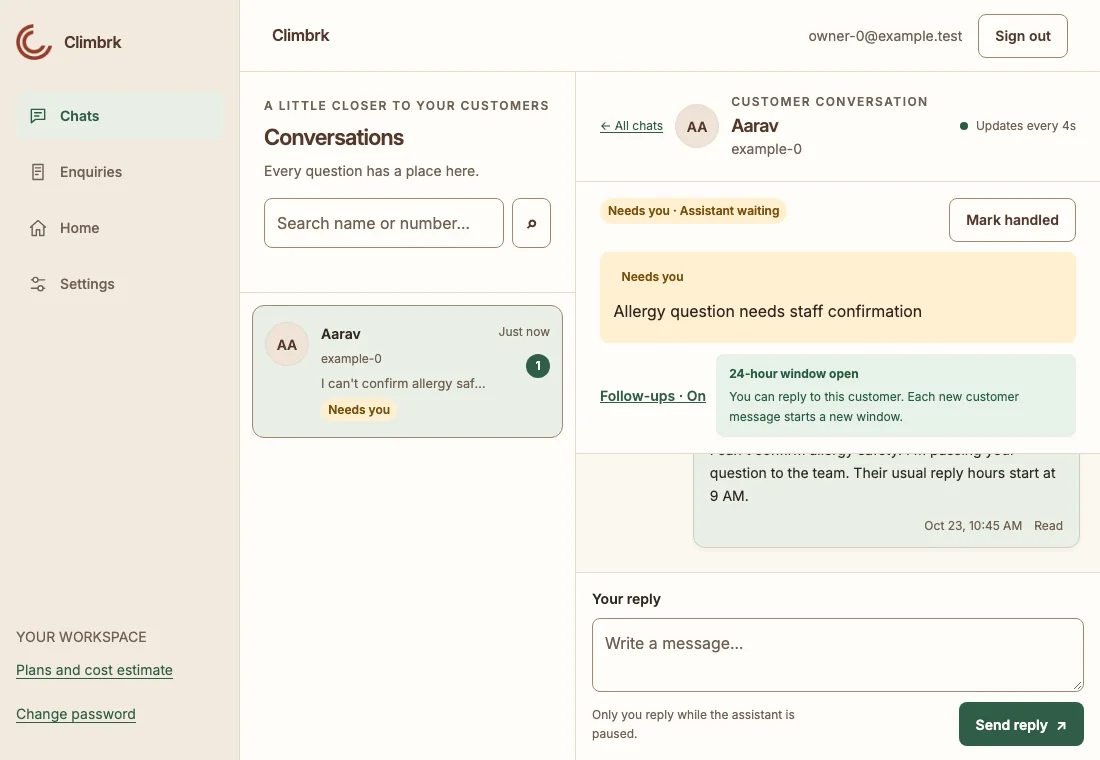
Open the shared inbox to read customer messages and the assistant’s replies. Questions marked Needs you are ready for a person to review.
See what the guest asked and what has already been answered.
The assistant pauses for that chat while you reply personally.
The assistant stays paused until you turn it back on.
Tell it what changed. “Cappuccino half aur full pe 20% off for 12 hours.” Review the exact prices, then confirm. Use the dashboard or your verified Owner WhatsApp number. Give each team member only the access they need.
Late questions. Menu questions. Table requests. Review them together. Changes have a named history and eligible edits can be undone within 24 hours. Keep an approved menu reference. Team seats depend on your plan.
TRY THE CUSTOMER EXPERIENCE
Ask about a menu, a price or a table. This is a scripted example, not the live assistant. Try a suggested question, then tap Take over to see how a person steps in. Nothing you type is saved and no real WhatsApp messages are sent.
Choose a suggested question, or write your own.
START WITH THE MENU YOU ALREADY HAVE
Upload a photo of your menu or price list. Review the suggested dishes, sizes and prices, correct anything that needs it, then save. You can also type the details yourself.
Try sample replies before customers receive them. Your assistant stays off until you connect WhatsApp and choose Go live.
Photos are read and not saved; extracted details and drafts can be saved.
See the setup steps →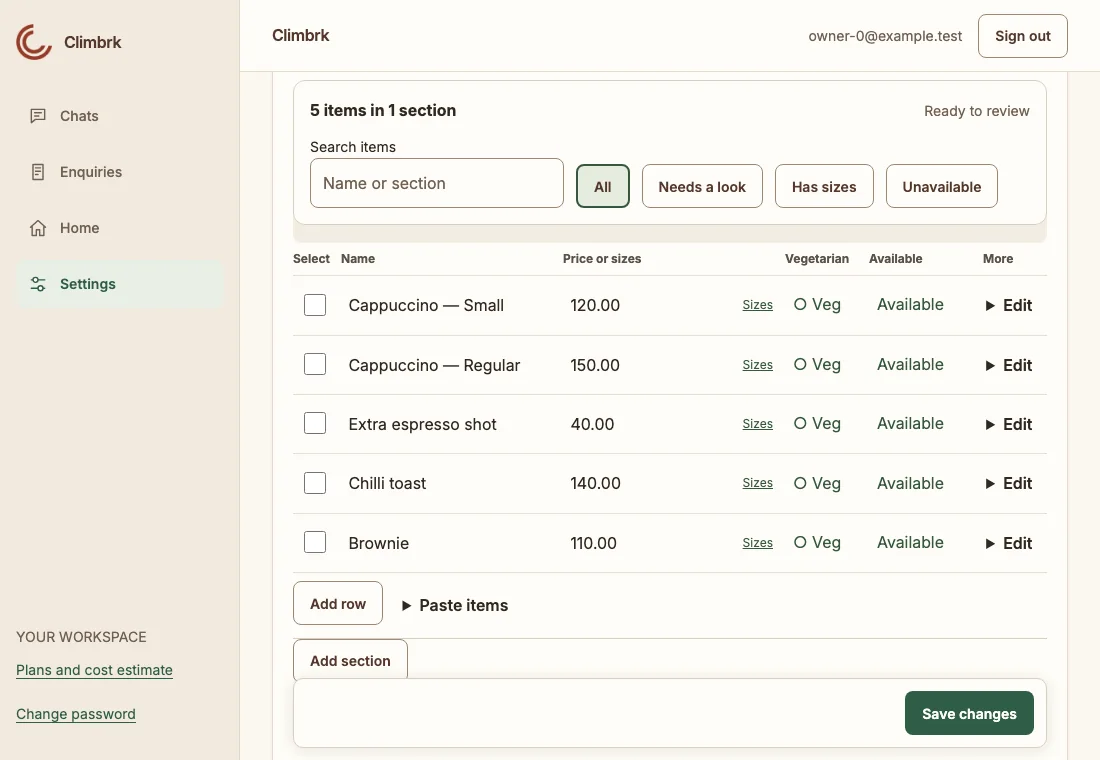
HELP WITH THE BASICS. PEOPLE FOR THE EXCEPTIONS.
When information is missing, a question can be flagged for your team. Allergy and safety questions, complaints and requests for a person wait for staff. Review replies regularly; AI can make mistakes.
See how staff takeover works →It is not a hotel room-booking or property-management system. It does not confirm table bookings or take payments in chat. Marketing campaigns are planned, not available today.
Helpful answers can help a guest decide what to try. Results depend on your information and service; bookings or sales are not guaranteed.
FROM YOUR MENU TO YOUR FIRST REPLY
Create an account and verify your email. Add your hours, location and the details customers ask for.
Start with a photo or type your details. Check the suggested prices, then try sample replies. The photo is not saved.
Connect an eligible WhatsApp number through Meta. Review your setup and choose Go live when you are ready.
A Facebook account with the right business access, a website or public business page, and access to verify an eligible phone number. This release needs a number not already registered with WhatsApp. Existing-number migration and app coexistence are not supported.
Read the full connection requirements →AVAILABLE NOW · FREE PILOT
Add your business details, review sample replies and decide whether it is useful for your restaurant or cafe.
Early access pilot
Try your business information and sample answers during the free pilot.
Paid plans only after 30 days' notice. Meta's charges are separate.
The proposed paid plans and one-time reply trial are not available to buy yet. Meta, the company behind WhatsApp, bills separately for message delivery when charges apply.
See the combined budget before you connect →ONE INBOX. YOUR TEAM.
Give teammates their own login. Staff can reply and handle enquiries; Managers can update business information and manage Staff. Owners control access, WhatsApp and account settings. See who replied or took over a chat.
Starter, trial and PAYG are Owner-only. Standard includes 2 employee places; Growth includes 4. Team places are enabled by our team during the pilot.
Compare team places and plans →Use your own numbers to estimate message volume and manual replying time. This is not a promise of time saved.
YOUR INFORMATION. CLEAR CHOICES.
Setup photos are not saved; relevant text and photos go to Google for processing. Business details, chats and enquiries are stored to run the service. You can delete your account from Settings or contact us.
For the current connection flow, use a number that is not already registered with WhatsApp. Existing-number migration and WhatsApp Business app coexistence are not supported in this release.
AI can make mistakes. Review the sample answers, keep your business information current, and take over when needed. The assistant is instructed to use only your information and hand off when it cannot answer.
Yes. Tap Take over to pause the assistant, then reply yourself. It stays paused until you turn it back on.
The app uses HTTPS, hashed passwords and checks that keep business accounts separate. The current deployment is hosted on Google Cloud in Iowa, United States (Google Cloud us-central1). Google Gemini and WhatsApp may process information in other locations. No system is risk-free. Read our privacy policy.
No coding is needed. Add your details by hand or upload a photo, review the suggestions, and try Preview. We help with the WhatsApp connection before you choose to go live.
Free during the pilot. Try your business information and sample answers during the free pilot. Paid plans only after 30 days' notice. Meta's charges are separate.
Hindi, English and Hinglish. Choose a preferred language and tone, or let it match the customer. Review the examples before going live.
Meta sets separate WhatsApp Platform fees. Charges depend on the message category, destination and current rates; templates outside the customer service window may be charged. Check Meta’s current pricing before connecting. See Meta’s current pricing.
During the pilot you can stop using the service. Owners can request deletion by email or use Settings → Delete account and data. Verified deletion requests are completed within 30 days, subject to the exceptions in the deletion policy. Read the data deletion instructions.
START WITH THE DETAILS GUESTS ASK FOR
Create an account and try your restaurant or cafe details. If you would prefer help with setup, leave your details here.
Start free setup ↗We use the form details to contact you about availability and setup.